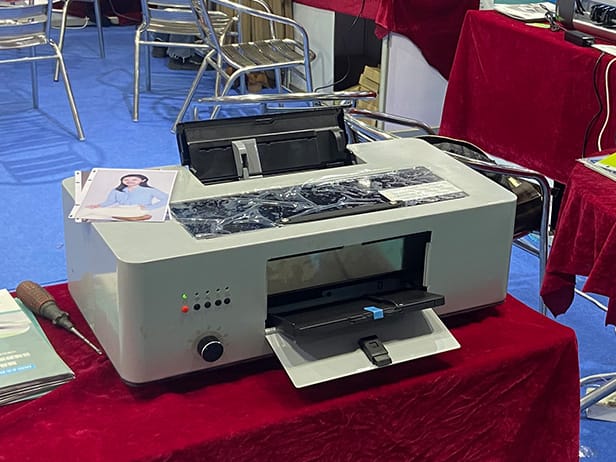

Choosing a commercial phone case printer is an important decision for businesses that want to produce customized phone cases, promotional products, branded accessories, or short-run orders.
The right machine needs to match your production volume, phone case materials, print quality requirements, available workspace, and operating budget. Instead of comparing specifications one by one, it is more practical to evaluate the printer according to your actual production needs.
This guide covers the key factors to consider before purchasing a commercial phone case printer.
1. Define Your Phone Case Printing Business
Start with the products and orders you plan to handle.
A commercial phone case printing business may focus on:
- Personalized phone cases
- Custom photo phone cases
- Promotional phone cases
- Corporate branded accessories
- Retail phone accessories
- OEM phone case production
- Private-label products
- Small-batch customized orders
Different business models require different printer configurations.
For example, a shop producing personalized cases one at a time may prioritize flexibility and easy operation. A manufacturer handling hundreds of cases per day will place greater importance on production efficiency, batch printing, and operating costs.
Define your main application before comparing machines.
2. Estimate Your Daily Production Volume
Production volume is one of the first specifications to consider when choosing a commercial phone case printer.
Estimate:
- Average orders per day
- Peak daily orders
- Average cases per order
- Expected monthly production
- Future production growth
For example:
Low-volume production
Suitable for customized orders, sample production, and small retail businesses.
Medium-volume production
Suitable for print shops, promotional product companies, and customization businesses.
High-volume production
Suitable for manufacturers, distributors, OEM suppliers, and businesses handling large commercial orders.
Do not choose a printer only according to today’s order volume. If you expect your phone case business to grow, leave enough production capacity for future orders.
3. Check the Printable Area
The printable area directly affects how efficiently you can produce phone cases.
When comparing a commercial UV phone case printer, check:
- Maximum print size
- Working table dimensions
- Maximum material thickness
- Fixture compatibility
- Number of cases per batch
- Positioning accuracy
A larger working area can allow multiple phone cases to be positioned at the same time.
For commercial production, this can reduce repeated loading and unloading and make batch printing more efficient.
The right printable area depends on your products rather than simply choosing the largest available machine.
4. Match the Printer to Your Phone Case Materials
Phone cases are manufactured from different materials, and their surfaces can behave differently during UV printing.
Common materials include:
- TPU
- PC
- Acrylic
- Hard plastic
- Leather and coated materials
- Silicone
- Composite materials
Before purchasing a phone case printing machine, test the materials you actually plan to sell.
Check:
- Ink adhesion
- Color reproduction
- White ink coverage
- Surface compatibility
- Curing performance
- Scratch resistance
- Overall finished appearance
A supplier should be able to provide printing samples or test your own phone cases before you place a large order.
5. Select the Right Ink Configuration
Ink configuration has a direct impact on the products you can offer.
A commercial UV printer may use:
CMYK
For standard full-color images and graphics.
CMYK + White
Useful for dark-colored and transparent phone cases where a white base layer is required.
CMYK + White + Varnish
Suitable for businesses that want to offer additional effects such as glossy details, spot varnish, and raised textures.
For phone case customization, white ink is particularly useful because many cases are black, transparent, or dark-colored.
Varnish can also help businesses create premium products with additional visual and tactile effects.
6. Evaluate Actual Print Quality
Do not select a printer based only on the resolution number listed in the specification sheet.
Request real samples and examine:
- Small text
- Fine lines
- Logos
- Photographic images
- Gradients
- Skin tones
- Dark colors
- White areas
- Varnish effects
- Raised printing
Print the same artwork on different phone case materials if possible.
The finished product is more important than a specification on paper.
For businesses selling personalized products, consistent image quality is especially important because customers can easily compare the printed case with the original digital artwork.
7. Compare Real Production Speed
Commercial phone case printing should be evaluated according to actual production output rather than the maximum speed advertised by the manufacturer.
Look at the complete workflow:
Artwork preparation → Phone case positioning → Printing → UV curing → Unloading → Finishing
Ask the supplier:
- How many cases can be printed in one batch?
- How long does a typical batch take?
- How much setup time is required?
- Can different case designs be printed together?
- How much operator intervention is required?
A printer with a high theoretical speed may not provide the highest daily output if the operator needs to frequently reposition materials or perform complicated setup procedures.
For a commercial operation, actual finished cases per hour are more useful than maximum print speed alone.
8. Consider Multi-Case Batch Printing
Batch production can significantly affect the efficiency of a phone case printing business.
If the working platform and fixture allow multiple cases to be positioned at once, the operator can prepare several cases before starting the printing cycle.
This is useful for:
- Bulk orders
- Corporate phone cases
- Promotional products
- Multiple customer orders
- Retail inventory
- OEM production
When comparing commercial phone case printers, ask for the practical number of cases that can be printed in one production cycle.
9. Calculate Ink Consumption
Ink consumption affects your long-term operating cost.
Do not compare printers only by purchase price. Ask the supplier about typical ink consumption for the type of phone case designs you plan to produce.
Your calculation should include:
- CMYK ink
- White ink
- Varnish
- Cleaning solution
- Phone case cost
- Electricity
- Maintenance
- Labor
A printer with a lower initial purchase price may not be the most economical option if its operating costs are significantly higher.
Calculate the estimated cost per finished phone case before making a purchasing decision.
10. Consider Your Available Workspace
Commercial UV printers require more than the footprint of the machine itself.
Check:
- Printer dimensions
- Table and fixture space
- Operator working area
- Material storage
- Computer workstation
- Ventilation
- Power requirements
- Loading and unloading space
Make sure the operator can comfortably access the printing platform and perform routine maintenance.
A well-planned workspace can also improve production efficiency and reduce unnecessary handling.
11. Check Maintenance Requirements
A commercial phone case printer will require regular maintenance to maintain stable print quality.
Before purchasing, ask about:
- Printhead cleaning
- White ink circulation
- Ink system maintenance
- Daily maintenance procedures
- Long-period shutdown procedures
- Consumable replacement
- Printhead replacement
- Recommended maintenance intervals
White ink systems deserve particular attention because white pigment can settle if the printer is not operated or maintained correctly.
Choose a machine with a maintenance process that your operators can realistically follow every day.
12. Evaluate Technical Support and Spare Parts
For a commercial business, after-sales service can be just as important as the printer itself.
Ask the manufacturer about:
- Installation support
- Operator training
- Remote technical support
- Troubleshooting assistance
- Warranty coverage
- Printhead support
- Spare parts availability
- Software support
If the machine stops working during a large customer order, delayed technical support can directly affect your delivery schedule.
For overseas buyers, confirm how technical support and spare parts are handled before purchasing the machine.
13. Calculate the Total Investment
The initial printer price is only part of the total investment.
Consider:
Printer + ink + phone cases + maintenance + spare parts + labor + electricity + packaging + potential downtime
You should also estimate your expected revenue.
For example:
Selling price per case − production cost per case = gross profit per case
Then:
Monthly gross profit × monthly sales volume = estimated monthly gross profit
This gives you a more realistic basis for comparing different commercial phone case printers.
14. Choose a Printer That Supports Different Business Models
A good commercial phone case printer should allow your business to expand beyond basic personalized orders.
You can potentially offer:
Personalized Phone Cases
Use customer photos, names, artwork, and custom designs.
Corporate Products
Print company logos and branded graphics for promotional campaigns and corporate gifts.
OEM Production
Produce customized phone cases for other businesses and brands.
Private Label Products
Create phone case collections for retailers, distributors, designers, and online brands.
Short-Run Manufacturing
Produce small quantities of new designs without investing in large volumes of pre-printed inventory.
This flexibility can make a UV phone case printer useful as your business develops.
15. Request Samples Before You Buy
A practical test is one of the best ways to evaluate a commercial phone case printer.
Send the supplier:
- Your own phone cases
- Your typical artwork
- Company logos
- Detailed images
- Dark-colored cases
- Transparent cases
- Different case materials
Ask for finished samples.
Then evaluate:
- Color accuracy
- Image sharpness
- White ink coverage
- Ink adhesion
- Surface finish
- Raised effects
- Production time
- Finished product consistency
Testing your own products is more useful than relying only on generic samples provided by the manufacturer.
16. Commercial Phone Case Printing with Beric
Beric provides UV printing solutions for businesses producing customized phone cases and other personalized products.
When selecting a Beric commercial phone case printer, businesses can evaluate the suitable configuration according to:
- Expected production volume
- Required print size
- Phone case materials
- Desired print effects
- Number of cases per batch
- Available workspace
- Operating requirements
Beric UV printing technology can be used for personalized phone cases, promotional products, branded accessories, OEM production, and other customized printing applications.
For businesses purchasing equipment for commercial production, the recommended configuration should be based on the actual products and production requirements rather than simply choosing a machine based on maximum specifications.
Commercial Phone Case Printer Buying Checklist
Before placing an order, make sure you have clear answers to the following:
Production
- What is my average daily production?
- What is my expected peak production?
- How many cases can be printed per batch?
Printing
- What is the maximum printable area?
- Which phone case materials can be printed?
- Is white ink available?
- Is varnish available?
- Can the printer create raised effects?
Operating Cost
- What is the average ink consumption?
- What is the estimated cost per phone case?
- What maintenance costs should I expect?
Machine
- Does the printer fit my workspace?
- How much operator involvement is required?
- What maintenance does it require?
Support
- Is technical training included?
- How is remote support provided?
- Are spare parts readily available?
- What warranty is included?
Testing
- Can I send my own phone cases for testing?
- Can I receive samples using my own artwork?
Final Buying Advice
Choosing a commercial phone case printer should start with your business requirements, not the printer specification sheet.
Define your production volume, identify your main phone case materials, calculate your target production cost, and test the printing quality with your own products.
Then compare the machines based on:
Production capacity + print quality + material compatibility + ink cost + maintenance + technical support + total cost of ownership
For print shops, customization businesses, promotional product suppliers, and OEM manufacturers, a properly configured UV phone case printer can support both short-run customization and larger commercial production.
If you are looking for a commercial phone case printer for your business, contact Beric with your expected production volume, phone case materials, and sample artwork to discuss a suitable printing solution.