For a print shop, a phone case printer is not simply another piece of printing equipment. It needs to fit into the shop’s daily workflow, handle different phone case models, produce consistent print quality, and support profitable short-run and custom orders.
For shops offering personalized phone cases, UV printing has become a practical production method for creating custom designs directly on phone cases. However, choosing the right machine requires more than comparing printer prices.
This guide focuses on the factors that matter in real print shop operations, from order volume and print speed to materials, image quality, maintenance, and business applications.
1. Match the Printer to Your Daily Order Volume
Start with your actual order volume rather than the maximum production capacity advertised by a manufacturer.
A small customization shop may receive orders for:
- 10–30 phone cases per day
- Personalized gifts
- One-off customer designs
- Small business promotional products
- Local event orders
A larger print shop may handle:
- 50–100+ phone cases per day
- Bulk customized orders
- Corporate promotional products
- Retail phone accessories
- OEM and private-label orders
For low-volume work, a compact UV printer can be sufficient. For a shop handling continuous commercial orders, production efficiency becomes much more important.
A commercial phone case printer should allow the operator to process multiple cases in one workflow instead of treating every phone case as a completely separate printing job.
2. Check the Actual Printing Area
Print shops rarely produce only one phone case model.
Customers may request cases for different iPhone, Samsung Galaxy, Google Pixel, and other smartphone models. The printable area therefore needs to match the products you intend to offer.
Before purchasing a printer, check:
- Maximum printing size
- Printable area
- Maximum material thickness
- Fixture or jig options
- Number of phone cases that can be positioned at once
- Compatibility with different case sizes
A larger flatbed printing area can be especially useful for commercial production because multiple phone cases may be positioned on the working platform during one production cycle.
For a print shop, this can be more important than simply choosing a machine with a higher advertised print speed.
3. Look for a UV Printer Designed for Direct Phone Case Printing
A phone case printer needs to work with the actual materials used by your customers.
Common phone case materials include:
- TPU
- PC
- Acrylic
- Leather
- Silicone and coated materials
- Hard plastic
- Composite materials
Not every material behaves the same way during UV printing.
Before buying, test your most commonly used phone case materials. Check adhesion, image quality, white ink coverage, curing performance, and resistance to scratching.
For shops selling custom phone cases, the ability to print directly onto the case is also important. Direct UV printing eliminates the need for additional transfer steps and makes it easier to produce one-off designs.
4. Pay Attention to White Ink Performance
White ink is particularly important for phone case printing.
Many phone cases are black, transparent, dark-colored, or made from materials where standard CMYK inks cannot provide sufficient color density.
A commercial UV phone case printer with white ink can create:
- White text
- White graphics
- Bright CMYK colors on dark surfaces
- Layered printing effects
- White underprinting
- Color designs on transparent materials
For example, a colorful design printed directly onto a black phone case normally requires a white ink layer to maintain strong color contrast.
For print shops, consistent white ink circulation and reliable white ink printing can therefore have a direct impact on daily production.
5. Consider Varnish and Raised Effects for Higher-Value Orders
Basic full-color phone case printing is only one part of the market.
Print shops can also offer premium effects such as:
- Glossy details
- Matte effects
- Raised textures
- 3D-style lettering
- Spot varnish
- Textured logos
These effects can be used for premium personalized phone cases, company logos, branded merchandise, and promotional products.
Instead of competing only on the price of a printed phone case, print shops can use these effects to create higher-value products.
6. Print Quality Matters More Than the Maximum DPI Number
Printer specifications often highlight resolution, but print shops should evaluate the actual finished phone case.
Before purchasing, request samples and inspect:
- Small text
- Fine lines
- Skin tones
- Gradient transitions
- Logo details
- White ink coverage
- Dark-color reproduction
- Varnish or raised effects
A high-resolution specification does not automatically guarantee a good commercial result.
For phone case printing, the final product needs to look good under normal retail lighting and at close viewing distances.
7. Evaluate Production Efficiency, Not Just Print Speed
Print speed is important, but it should be evaluated together with the complete production process.
A print shop needs to consider:
Artwork preparation → Case positioning → Printing → UV curing → Finished product
If a printer has a high theoretical print speed but requires frequent manual adjustments, cleaning, or repositioning, its real production efficiency may be lower than expected.
For commercial phone case printing, look at:
- Actual printing time per batch
- Number of cases per printing cycle
- Setup time
- Fixture loading time
- Ink consumption
- Maintenance requirements
- Operator involvement
The useful number is not simply “maximum printing speed.” It is how many finished phone cases your shop can realistically produce during a working day.
8. Calculate Ink Cost Per Phone Case
Printer price is only one part of the investment.
For regular production, calculate the running cost of each phone case.
Your calculation should include:
- UV ink consumption
- White ink consumption
- Varnish consumption
- Phone case cost
- Electricity
- Labor
- Maintenance
- Packaging
- Rejected or reprinted products
For example, if your shop sells a customized phone case for $20, the printer itself is not the only factor determining profitability.
The real question is how much it costs to produce one finished case and how many cases you can sell each month.
This calculation can help you compare different commercial UV printers more realistically.
9. Consider the Types of Orders Your Print Shop Wants to Accept
A good phone case printer should support more than one business model.
A print shop can use UV phone case printing for:
Personalized Orders
Customers can submit names, photos, artwork, or custom graphics.
This works well for:
- Gifts
- Birthday products
- Couple products
- Pet photos
- Personalized accessories
Business and Promotional Orders
Companies can order phone cases printed with:
- Logos
- Brand colors
- Campaign graphics
- Event information
- Promotional designs
This can create larger orders than individual retail customers.
OEM and Private Label Production
Phone case suppliers and accessory businesses can use UV printing for customized product lines.
Print shops can produce cases for different brands, retailers, designers, and distributors without requiring large production runs.
Short-Run Product Testing
A UV printer also allows businesses to test new phone case designs without ordering large quantities of pre-printed products.
This is particularly useful when launching seasonal designs or testing customer demand.
10. Choose a Printer That Fits Your Workspace
Commercial equipment needs to fit into the actual production environment.
Before purchasing, measure:
- Printer dimensions
- Working table space
- Operator access
- Material storage
- Ventilation
- Power requirements
- Computer/workstation space
Also leave sufficient room for loading and unloading phone cases.
A printer that technically fits inside the shop but leaves no room for efficient operation can become a daily inconvenience.
11. Check Maintenance Requirements Before Buying
A phone case printer is a production machine, so maintenance should be considered before purchase.
Ask the supplier about:
- Printhead maintenance
- White ink circulation
- Daily cleaning procedures
- Ink system maintenance
- Recommended operating frequency
- Replacement parts
- Remote technical support
- Warranty coverage
- Training and installation support
For a print shop, downtime can be more expensive than routine maintenance.
A practical supplier should provide clear maintenance instructions and technical support rather than simply selling the printer.
12. Compare the Total Cost of Ownership
Instead of comparing only the purchase price, calculate the expected cost over several years.
Consider:
Printer cost + ink + maintenance + replacement parts + labor + electricity + downtime
A cheaper printer is not necessarily the lower-cost option if it consumes more ink, requires frequent maintenance, or produces inconsistent results.
For commercial applications, reliability and production consistency should be included in the purchasing decision.
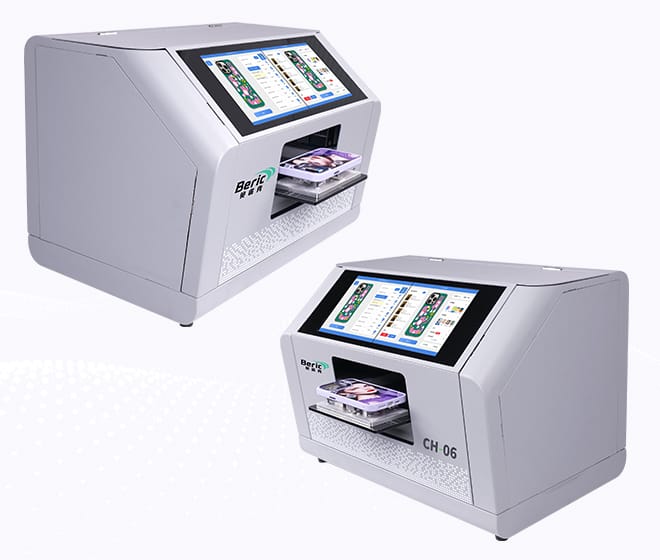
13. Beric Commercial UV Printers for Phone Case Printing
For print shops expanding into customized phone cases, Beric provides UV printing solutions designed for direct printing applications.
A commercial UV printer can be integrated into workflows for personalized phone cases, promotional products, branded accessories, and short-run customized products.
When selecting a Beric printer, print shops can evaluate the machine according to their expected production volume, printable area, material requirements, desired print effects, and available workspace.
For businesses planning to purchase a phone case printer, the best configuration depends on the products and order volume rather than simply choosing the largest machine.
14. Practical Checklist Before Ordering a Phone Case Printer
Before making a purchase, ask the supplier for clear answers to these questions:
- What is the actual printable area?
- How many phone cases can be printed in one batch?
- Which phone case materials have been tested?
- Can it print white ink?
- Is varnish available?
- Can it produce raised or textured effects?
- What is the typical ink consumption per case?
- What is the recommended daily production volume?
- What maintenance is required?
- How often should the printhead be cleaned?
- Are replacement parts available?
- What technical support is provided?
- Can the supplier provide sample phone cases?
- Can the machine be tested with our own phone case materials?
Getting samples printed with your own designs and materials is one of the most practical steps before placing an order.
Final Considerations for Print Shops
The best phone case printer for a print shop is not necessarily the cheapest machine or the one with the highest advertised speed.
A better purchasing decision comes from matching the printer to your actual business:
Order volume + printable area + materials + print quality + production workflow + ink cost + maintenance + service support
For shops focused on personalized products, promotional merchandise, OEM production, or short-run customization, a commercial UV phone case printer can become a flexible production tool rather than a machine used for only one product.
If you are planning to add custom phone case printing to your print shop, evaluate your expected daily orders first, then select the printer configuration that matches your production requirements.